Projects
Projects

I design end-to-end product experiences and the UX systems that sustain them — from early foundations through growth, optimization, and scalability.
Celigo was a Series A SaaS startup, and I was the first product designer. The platform’s success depended on enabling customers to build and maintain complex data integrations independently, without relying on professional services. Its current Gartner position was Niche, though it would move to Leader.
Flow creation was the core of the product’s value, but it relied on a series of complex forms to connect data. The flow builder itself was in alpha state, but needed to become the core way users built and evolved flows.
Celigo’s early platform hid everything inside an app dropdown with no sidebar, no onboarding, and no concept of where you were in the product. Users couldn’t see flow status, error history, or even how many flows existed; only determined developers could succeed. Time-to-value was extremely high and confusion was the norm. One developer I tested described it as being stuck in a black box, with no map to navigate. Business users — a major growth audience — couldn’t get started at all.
Additional constraints made the problem harder:
The platform’s UX was a direct blocker to product adoption, enterprise growth, and trial conversion.
The old design had no navigation, didn't bring forth errors, hid available actions. It had low adoption and conversion, and even developers found it difficult to use.


I designed and architected the entire platform experience from the ground up — as a team of one — and gradually built the foundation for what later became an international UX organization.
The new homepage showed which connections were broken, where you'd left off, number of errors, number of flows in an integration. It also made getting started easy, as most users were looking to create flows, and didn't understand what connections are integrations were at this point.

Even with the initial redesign, companies with many integrations had a hard time with the tile flow, so I pushed for a list view with dashboard, which brought a lot more information forward on what needed attention, what was available for additional integrations, and aligning with what would become the company North Star, getting people to create more flows.


We added onboarding and guided tours at every point in the flow creation journey.

This error management tour reduced the complexity of the most important thing, getting flows working and sending data, which meant making sure all errors were resolved quickly.

Creating flows was critical to retention and stickiness. Later, it would become the company's North Star. Optimizing the process of building, evolving, and managing flows was the core focus.
The new flow builder canvas reduced complexity. Previously all controls were shown at once, overwhelming users, especially business ones, and it was impossible to see what was working and what wasn't, or where you or a team member had left off in building a flow. Despite experimenting with rectangular nodes, the flow builder node shapes were something that the executive team wanted to keep, even though it did make building flows, bringing forth information, and understanding what needed attention more difficult.

Initially, you couldn't modify flows at all once built. That included what applications were used to send data. If you switched to another application, such as Shopify to Amazon, you had to create the flow from scratch. Adding this ability paved the way for copying flows and modifying them, greatly reducing manual effort and time to get flows up and running.

The new flow brancher enabled flows to evolve and expand with changing business needs. Prior to this, flows were not very adaptable and flow complexity wass limited. This came about from learning how customers were using filtering to create flow branching. Adding branching was critical to customer need platform evolution.


The new flow mapper let users align their data field mapping with the actual structure of their JSON, rather than trying to map flat data structures.

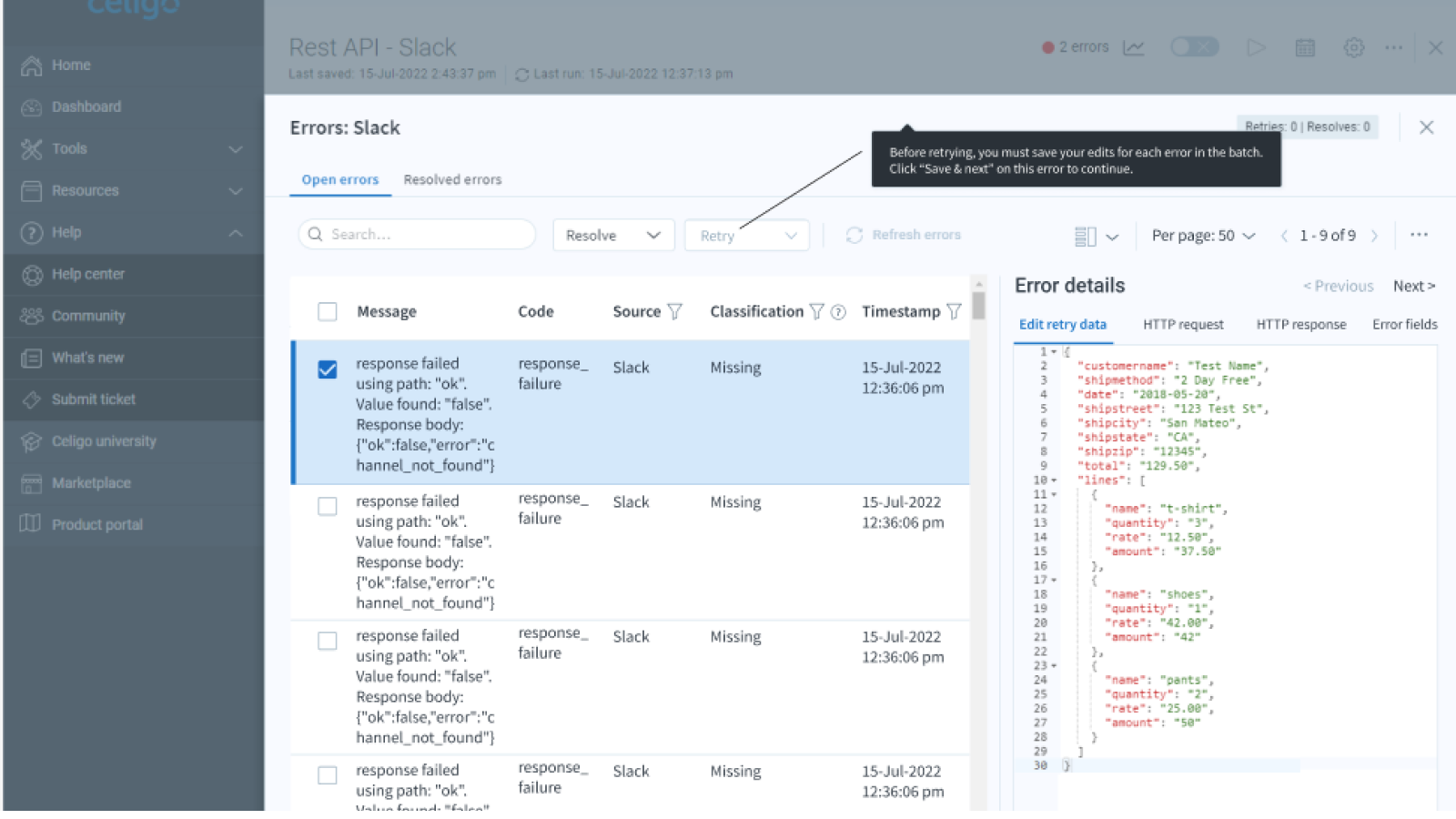
Initially there was no information about errors, error messages were truncated, you could only resolve one issue at a time. The CTO and a customer said that these error management improvements revolutionized the platform.


The error resolution console continued to evolve, including adding the ability to batch process resolved errors. Users could see at a glance how to resolve errors. This was aided by a troubleshooting guide we created in our help center.

