Projects
Projects

I design end-to-end product experiences and the UX systems that sustain them — from early foundations through growth, optimization, and scalability.
Celigo was a Series C SaaS startup, and I was the first product designer. The platform’s success depended on enabling customers to build and maintain complex data integrations independently, without relying on professional services. Its current Gartner position was Visionary, though it would move to Leader.
The platform lacked unified search, meaning users couldn’t easily find their own flows, team assets, or reusable resources. Although a Marketplace existed, analytics I implemented revealed extremely low engagement: the majority of offerings (70%+) had never been previewed or installed. Customer interviews confirmed the issue — users rarely knew that paid integration apps or free template flows even existed, despite their ability to save hours of setup effort.
Users struggled to find even their own resources inside the platform. Marketplace templates — ready-made flows that could dramatically accelerate onboarding and adoption — went largely unused because users didn’t know they existed or couldn’t search effectively. There was no unified search; results were siloed by object type, which forced developers to build flows from scratch instead of reusing proven solutions.
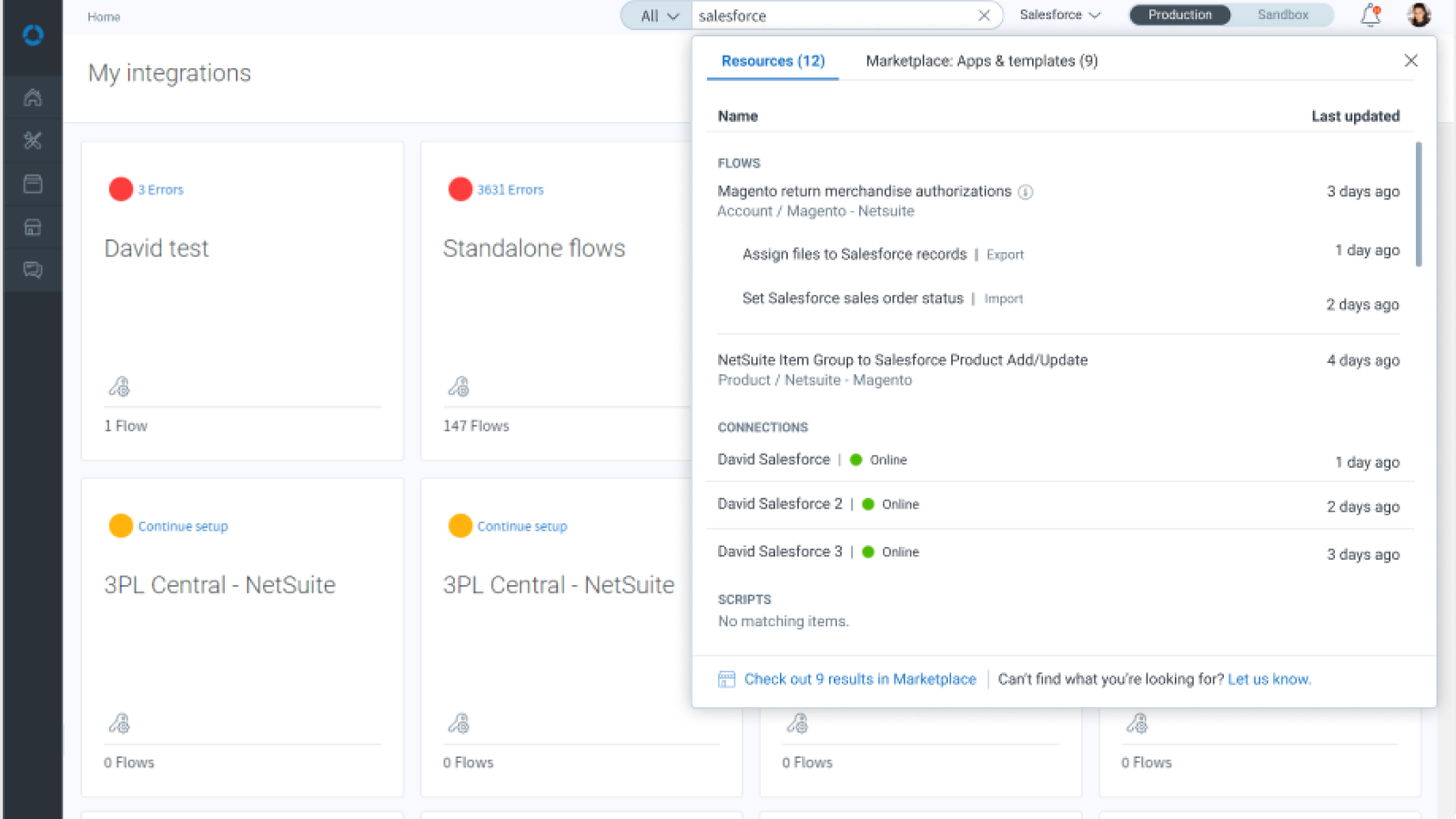
Search only filtered the list at this time, with no indication of when something had been modified. It also did not bring forth any Marketplace offerings.
To validate the problem, I instrumented analytics across the Marketplace and discovered that most templates weren’t even being previewed, let alone installed. Customer conversations confirmed the data: users simply didn’t know what existed or how to find it. This also revealed an opportunity to understand which offerings users valued and which were not worth continued investment.
The global search experience delivered:
This aligned with broader goals of improving onboarding and product-led growth—helping users find value faster, without external help.
This shifted Marketplace from a passive destination to an active discovery engine inside the product.
Users could now search not only their existing integrations, but also relevant integration apps and free template flows in the Marketplace. Integration apps were the company's main source of revenue at the time, and expanding the number of active flows would soon become the company's North Star.

Users could filter by resource type or include Marketplace offerings, enabling them to determine whether we had a native connector or they would need to use a universal one. This global search also provided a data pipeline for what connectors should be on our roadmap, while the Marketplace traffic determined what integration apps and templates we should be focusing on, reducing wasted time creating, testing, and documenting low-value offerings.

Robust search results showed matching flows, connections, and scripts. It also brought forward information as to when an object was last modified, whether a connection was online, and brought forward the Marketplace offerings. It also enabled users to submit requests if they couldn't find a connector they needed and wanted us to try to prioitize it.

Filters applied: This indicates that there are filters applied, but it not the most salient. Adding a badge for number of filters would have been better.

Users could get demos of paid integration apps, or preview and install free templates. One aim was never to force users to start from zero. Increasing integration app usage was a main goal. It also gave us more data to augment the tracking pipeline I'd created to determine if some offerings were valuable, but just hadn't been findable before. This enabled us to streamline our efforts on what mattered most.

Users could go directly to the Marketplace and filter down by category and search criteria. This necessitated determining what categories could be used to group hundreds of connectors.

Users can quickly request a demo for a paid integration app, prompting higher conversions of this major revenue source, which was a main company goal. The next step was to be an in-product demo.
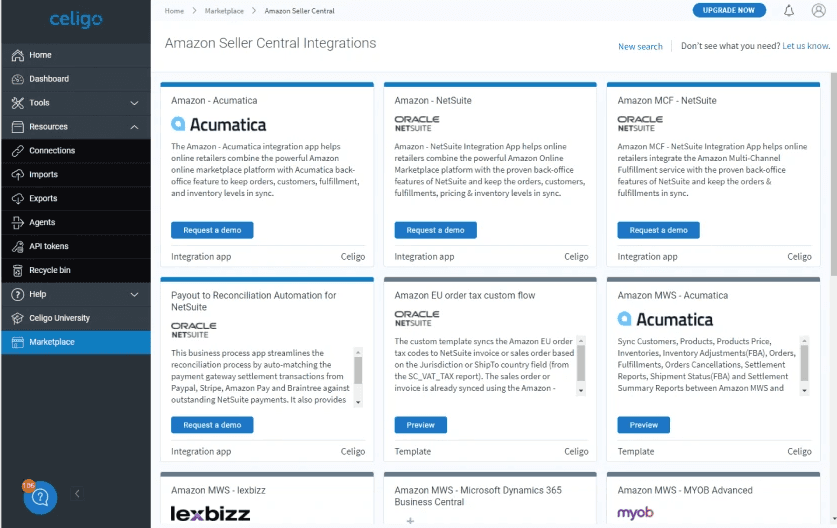
Instead of just an integration app or template name, this brought forth everything the customer needed to determine if it could meet their needs.They could request demos for integration apps or preview and immediately install the free template flow offerings.

