Making mapping data between flows intuitive

Creating nested data mapping w/ guidance

I design end-to-end product experiences and the UX systems that sustain them — from early foundations through growth, optimization, and scalability.
Initial company and product state

Company state

Celigo was a Series C SaaS startup at this point, and I was the first product designer and had built a small design team. The platform’s success depended on enabling customers to build and maintain complex data integrations independently, without relying on professional services. Its current Gartner position was Visionary, though it would move to Leader.

Product state

Flow creation was the core of the product’s value, but nesting between flat JSON data files was difficult, even for developers. From research, this was one of the biggest issues, made even more difficult with the fact that different connectors used different methods to map this flat data, which was very confusing for customers.

Challenge

Data mapping — the core activity of integrating two systems — was one of the biggest pain points for customers.

Before the redesign:

  • Input/output structures weren’t visible. Users mapped fields blindly.
  • All metadata (data types, lookup types, lock status) was hidden behind hover states.
  • Users had to flatten nested JSON structures into dot notation and indexes — a major cognitive exercise.
  • Universal connectors such as HTTP did not use the same dot notation, so this was a major customer frustration and continual question to support and services teams.
  • Troubleshooting was nearly impossible: error messages were truncated, inconsistent, and lacked context.
  • Users often had to rebuild mappings because they couldn’t understand what was already configured.
  • The entire mapping experience imposed unnecessary cognitive friction and made advanced flows nearly impossible for non-developers.

Approach

Instead of having to deal with trying to map flat JSON data structures, this mapper aligned with the nested structure of JSON data.

Phase 1: Reduce cognitive burden

Before introducing nested mapping, I first had to make the existing model usable. I worked with services, support, and customers to understand the major pain points.

I redesigned the mapper to:

  • Display input and expected output side by side
  • Bring key metadata forward:
    • data types
    • lock indicators
    • lookup types
    • mapping status
  • Remove hover-only controls and expose them clearly
  • Highlight fields with additional configuration needs

This dramatically reduced confusion around “what am I mapping and why?”

Phase 2: Align with nested mental models

Users thought in terms of nested JSON, but the tool forced everything into flattened fields.

I introduced:

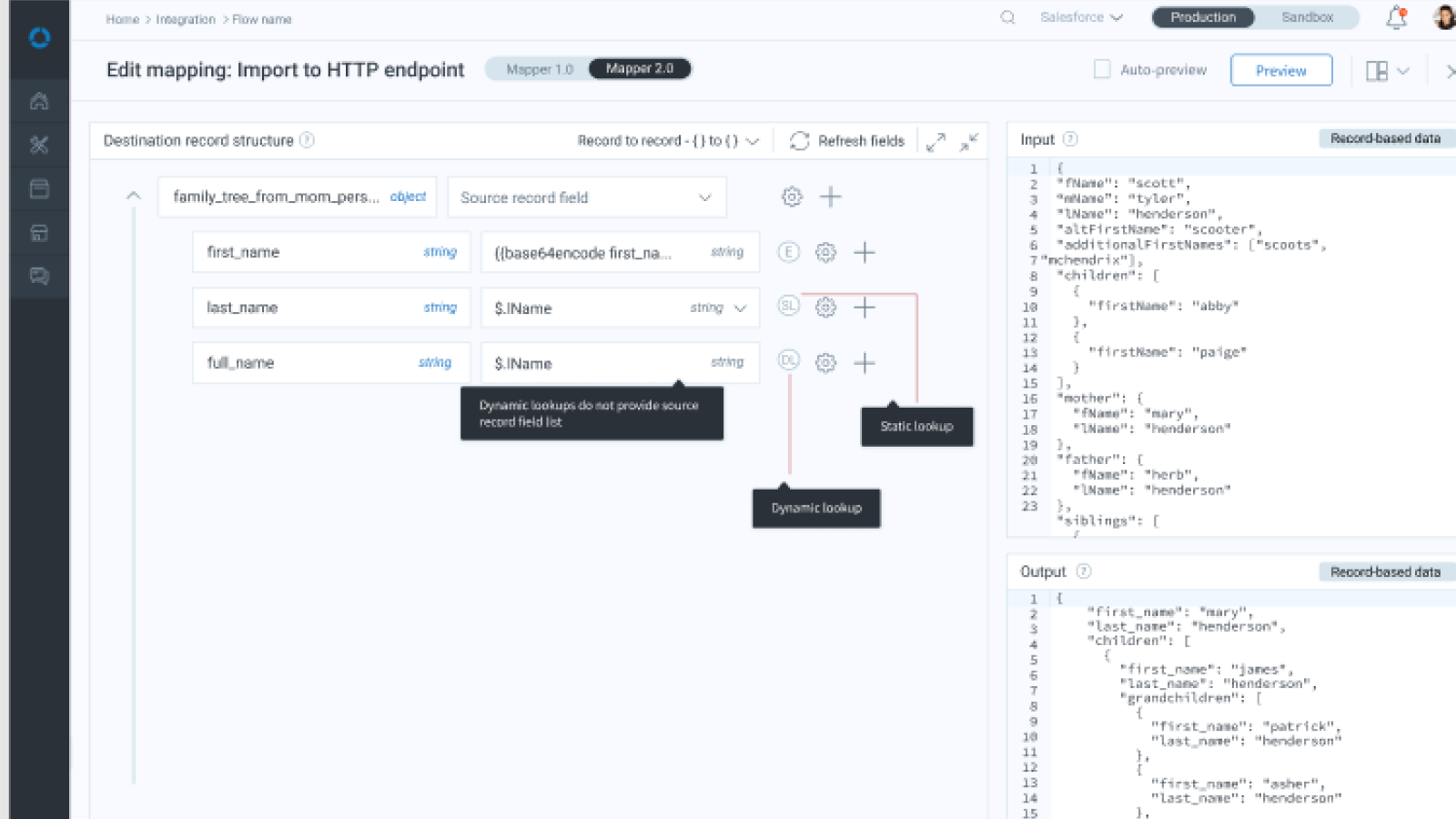
  • A nested structure view showing real hierarchy
  • Click-to-expand nodes for complex objects
  • Clear visual alignment between source and target
  • Field-level indicators for type, required status, and mapping logic
  • Auto-generation of correct handlebars/dot notation where needed (but hidden unless users wanted to see it)

This turned a once opaque mapping system into an intuitive, predictable experience.

Providing help exactly where you need it, bringing forth data types, enabling refreshing mapping for testing, previewing input and output and JSON structure type freed users from figuring out the particular proprietary format the previous data mapper required, and which changed based on JSON structure.

From the user feedback loop I built, we found that users couldn't tell which was a static and which was a dynamic lookup, so we brought that information forward.

Guiding them through mapping each field, drastically reducing trial-and-error.

Phase 3: Improve troubleshooting

Since mapping issues often surface during runtime:

  • Improved error message surfacing and expansion
  • Provided full context to understand why mappings failed
  • Integrated into the error management console
  • Added indicators helping users quickly see which mappings needed attention

This completed the loop between design → configuration → debugging.

Impact

  • Reduced mapping time significantly, especially for complex or deeply nested flows.
  • Lowered cognitive load, enabling business users to map fields without understanding dot notation or JSON structures.
  • Improved troubleshooting, saving engineering hours and reducing frustration.
  • Increased mapping accuracy, reducing downstream errors dramatically.
  • Enabled scalable growth, as enterprise flows often contain hundreds of fields and deeply nested objects.

Contributed to the overall platform transformation that moved Celigo into the Gartner Leaders quadrant.